

The Overview tab on All time, from the KPI cards to the device breakdown.
Open a form’s results
1
Open the form
Open the form from your workspace board or the Dashboard, then click Result at the top of the editor. You can also choose Results from a form card’s ⋯ menu.
2
Pick a tab
Switch between Overview, Summary and Responses. This page covers Overview.
3
Choose a date range
Use the date range to narrow the numbers: Today, Last week, Last month or All time.
KPI cards
A high Drop-off Rate or a long Avg Completion Time can point to a form that is too long. Surveys finish best under 8 questions, because completion drops after that.
Charts
- Total: charts Views, Submissions and Drop-Off for the selected date range.
- Device Breakdown: a donut chart splitting activity into Mobile, Desktop, Tablet and Other.
- Top Responses by question: a per-question look at the top responses.
Dashboard vs. per-form results
The two views use the same KPIs but answer different questions.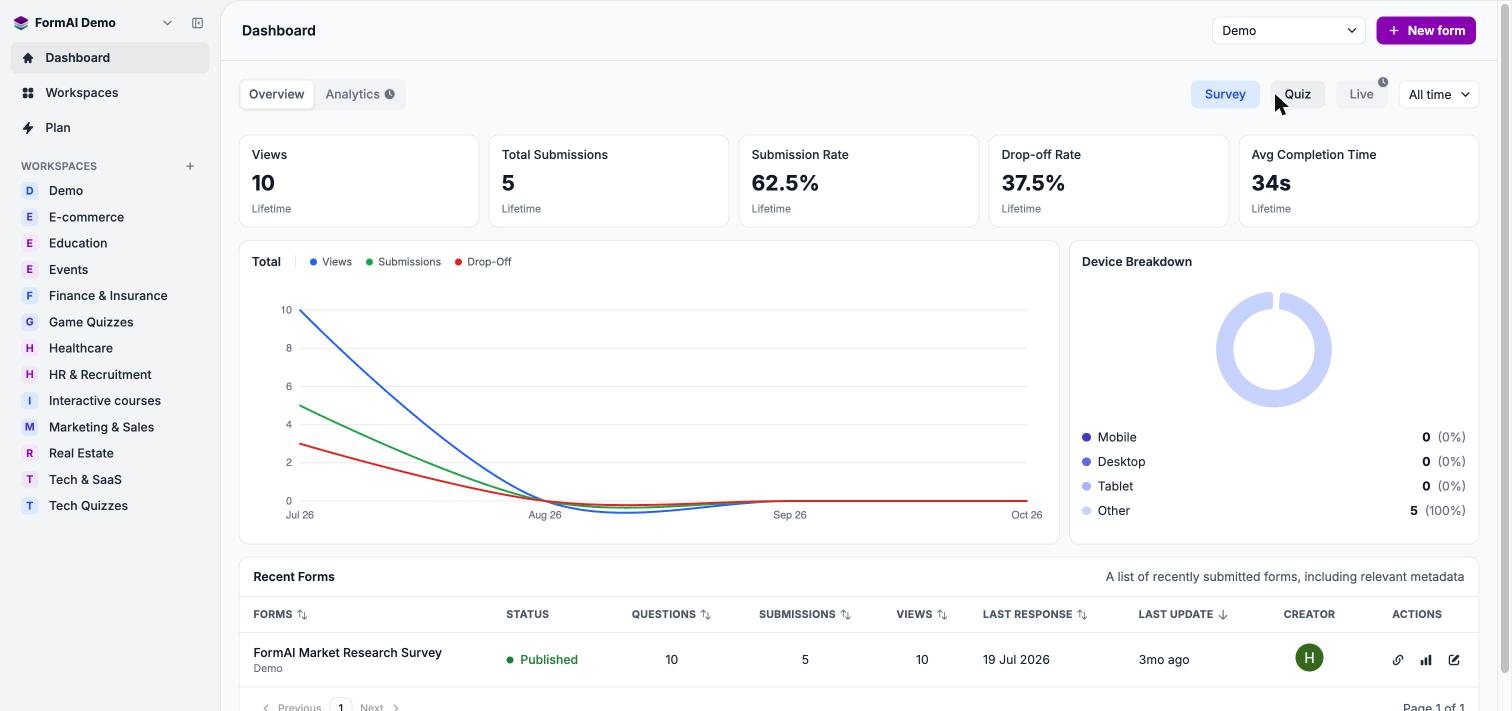
The Dashboard: KPIs, the Total chart, Device Breakdown and Recent Forms.
The Analytics tab and the Live filter on the Dashboard show a clock badge. They are marked as coming soon.
Next steps
Question summaries
See how respondents answered each question.
Individual responses
Read every response in a table.
Results concepts
How FormAI turns answers into analysis.
Manage workspaces
Open the Dashboard filtered to one workspace.