> ## Documentation Index
> Fetch the complete documentation index at: https://docs.formai.app/llms.txt
> Use this file to discover all available pages before exploring further.
# Live question types
> The question types available in a Live form, grouped as Live, Words, Opinion and Other.
Live forms have their own set of question types, built for a room full of people answering at once. Click **+** (Add question) in the editor toolbar to open the menu. Types are grouped into four categories.
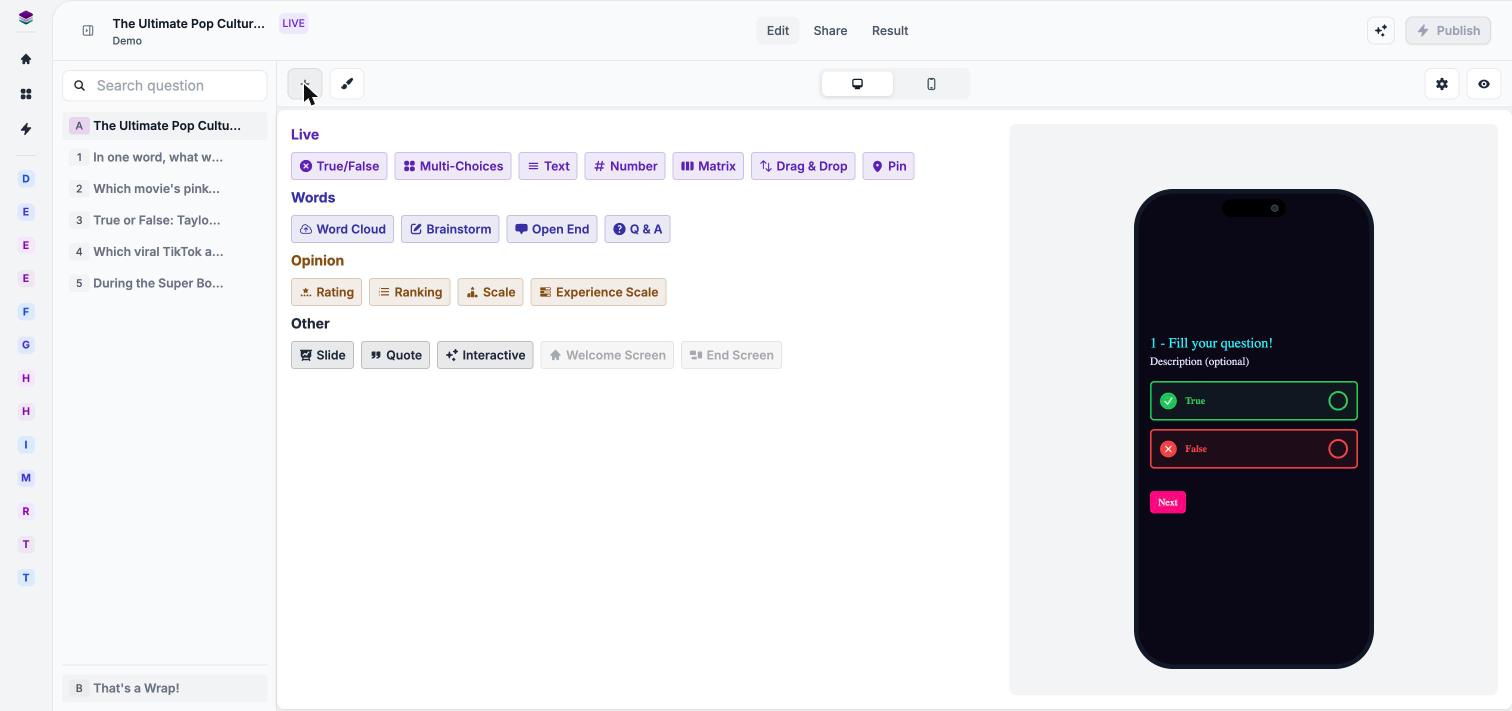 ## Live
The core question formats for a session.
| Type | What participants do |
| - | - |
| **True/False** | Choose between true and false. |
| **Multi-Choices** | Pick from a list of options. |
| **Text** | Type a short text answer. |
| **Number** | Enter a number. |
| **Matrix** | Answer across a grid of rows and columns. |
| **Drag & Drop** | Answer by dragging items. |
| **Pin** | Answer with a pin. Hover the type in the menu to preview how it looks. |
## Words
Questions that gather ideas and open input from the room.
| Type | What participants do |
| - | - |
| **Word Cloud** | Submit words that are combined into a word cloud. |
| **Brainstorm** | Contribute ideas. |
| **Open End** | Write a free-form answer. |
| **Q & A** | Submit questions or comments for the host. |
## Opinion
Questions that measure how people feel.
| Type | What participants do |
| - | - |
| **Rating** | Give a rating. |
| **Ranking** | Put options in order of preference. |
| **Scale** | Choose a point on a scale. |
| **Experience Scale** | Rate an experience on a scale. |
## Other
Building blocks that structure your session.
| Type | What it does |
| - | - |
| **Slide** | Presents content to the room. |
| **Quote** | Displays a quote. |
| **Interactive** | An interactive element. Hover the type in the menu to preview how it looks. |
| **Welcome Screen** | The opening screen participants see. |
| **End Screen** | The closing screen participants see. |
Hover over a type in the Add question menu to see a live preview before you add it.
## Scoring in Live sessions
Scored questions feed the leaderboard during a session. Set points, penalties and correct answers in **Field settings**. See [Scoring and correct answers](/user-guide/quizzes/scoring-and-answers).
## Next steps
Open the presenter view and welcome participants.
Set points, penalties and time limits.
See the types available in Survey and Quiz forms.
Customize the first and last screens.
This documentation is built and hosted on [Mintlify](https://mintlify.com), a developer documentation platform.
## Live
The core question formats for a session.
| Type | What participants do |
| - | - |
| **True/False** | Choose between true and false. |
| **Multi-Choices** | Pick from a list of options. |
| **Text** | Type a short text answer. |
| **Number** | Enter a number. |
| **Matrix** | Answer across a grid of rows and columns. |
| **Drag & Drop** | Answer by dragging items. |
| **Pin** | Answer with a pin. Hover the type in the menu to preview how it looks. |
## Words
Questions that gather ideas and open input from the room.
| Type | What participants do |
| - | - |
| **Word Cloud** | Submit words that are combined into a word cloud. |
| **Brainstorm** | Contribute ideas. |
| **Open End** | Write a free-form answer. |
| **Q & A** | Submit questions or comments for the host. |
## Opinion
Questions that measure how people feel.
| Type | What participants do |
| - | - |
| **Rating** | Give a rating. |
| **Ranking** | Put options in order of preference. |
| **Scale** | Choose a point on a scale. |
| **Experience Scale** | Rate an experience on a scale. |
## Other
Building blocks that structure your session.
| Type | What it does |
| - | - |
| **Slide** | Presents content to the room. |
| **Quote** | Displays a quote. |
| **Interactive** | An interactive element. Hover the type in the menu to preview how it looks. |
| **Welcome Screen** | The opening screen participants see. |
| **End Screen** | The closing screen participants see. |
Hover over a type in the Add question menu to see a live preview before you add it.
## Scoring in Live sessions
Scored questions feed the leaderboard during a session. Set points, penalties and correct answers in **Field settings**. See [Scoring and correct answers](/user-guide/quizzes/scoring-and-answers).
## Next steps
Open the presenter view and welcome participants.
Set points, penalties and time limits.
See the types available in Survey and Quiz forms.
Customize the first and last screens.
This documentation is built and hosted on [Mintlify](https://mintlify.com), a developer documentation platform.