> ## Documentation Index
> Fetch the complete documentation index at: https://docs.formai.app/llms.txt
> Use this file to discover all available pages before exploring further.
# Workspaces
> How organizations, workspaces, forms, and people relate in FormAI, and how the workspace board tracks each form by status.
A workspace is a separate space for its own forms and members. It keeps one team's or project's work apart from another's, for example a Customer Research workspace next to an Events workspace.
## Organization and workspace
FormAI has two levels. They answer different questions.
| | Organization | Workspace |
| - | - | - |
| **What it is** | The top-level container for your team. You switch between organizations at the top of the left sidebar. | A space for related forms and the people who work on them. |
| **What it holds** | Your workspaces and the monthly AI credit allowance. | Forms and members, scoped to that workspace. |
| **Where you find it** | The organization name at the top of the sidebar. Select it to open the organization menu. | The **WORKSPACES** list in the sidebar, and the **Workspaces** page. |
The organization menu also holds your **Theme** (Light and other options), **Notifications**, your profile, and sign out. The AI credit allowance belongs to the organization, not to a single workspace. See [Plans and AI credits](/user-guide/account/plans-and-ai-credits).
## The workspace board
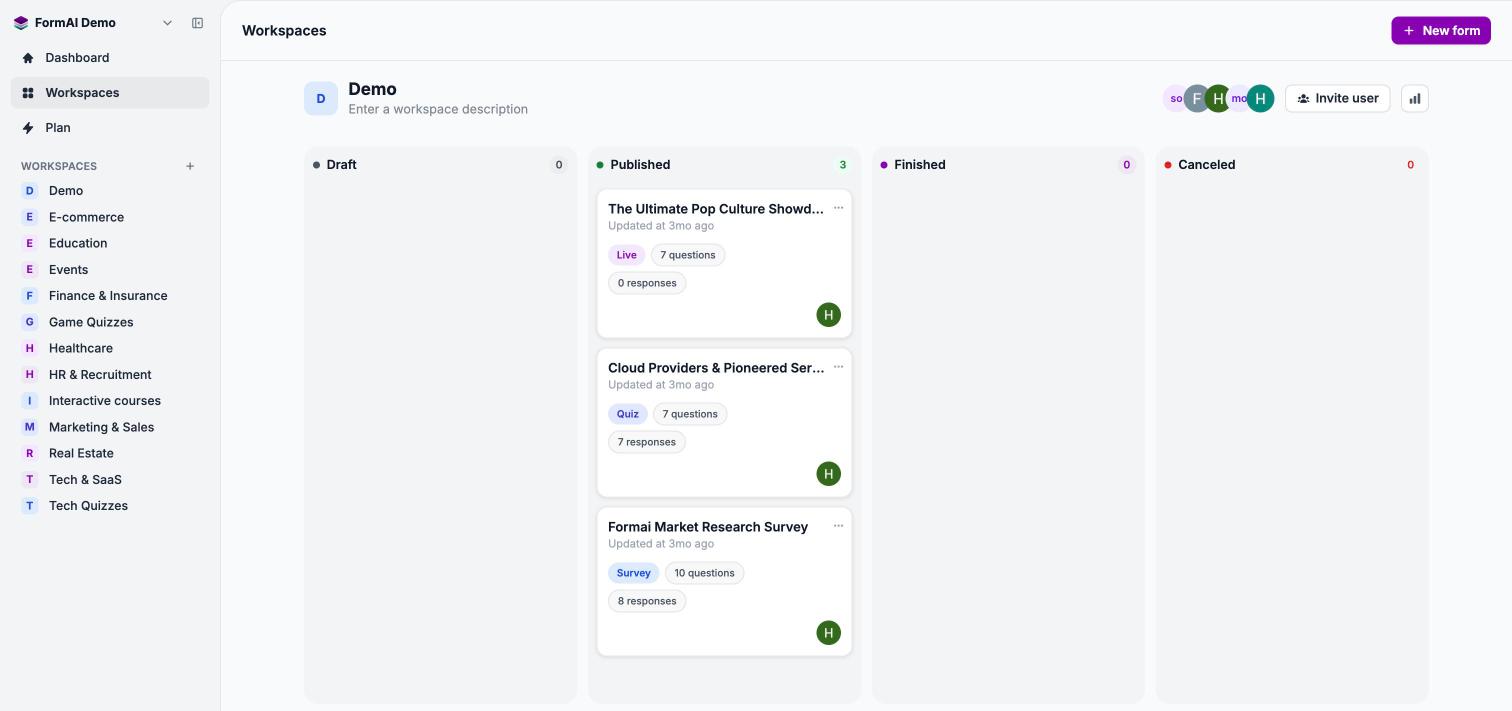
The **Workspaces** page shows one workspace as a board, with a column for each form status.
 | Column | Meaning |
| - | - |
| **Draft** | Forms you are still building. |
| **Published** | Forms you have published with **Publish**. |
| **Finished** | Forms that have been marked as finished. |
| **Canceled** | Forms that have been marked as canceled. |
Each form card shows the title, when it was last updated, a type badge (Survey, Quiz, or Live), the question count, the response count, and the creator. The **⋯** menu on a card offers **Copy link**, **Edit**, **Rename**, **Results**, and **Delete**.
The workspace header shows the workspace name, an editable description, the member avatars, and **Invite user**. The analytics button in the header opens the **Dashboard** filtered to that workspace.
## People and roles
You add people to a workspace with **Invite user**. Pick a role, add one or more email addresses, and FormAI sends each person an email invite. Invites expire after 7 days.
| Role | In general terms |
| - | - |
| **Admin** | Manages the workspace and its people. |
| **Manager** | Manages forms and sends invites. |
| **Member** | Creates and edits forms. |
| **Viewer** | Can view the workspace and its forms. |
This is a general description of the roles, not a full permissions list. Check what each person can do in the app before you rely on a role for something sensitive.
## Create a workspace
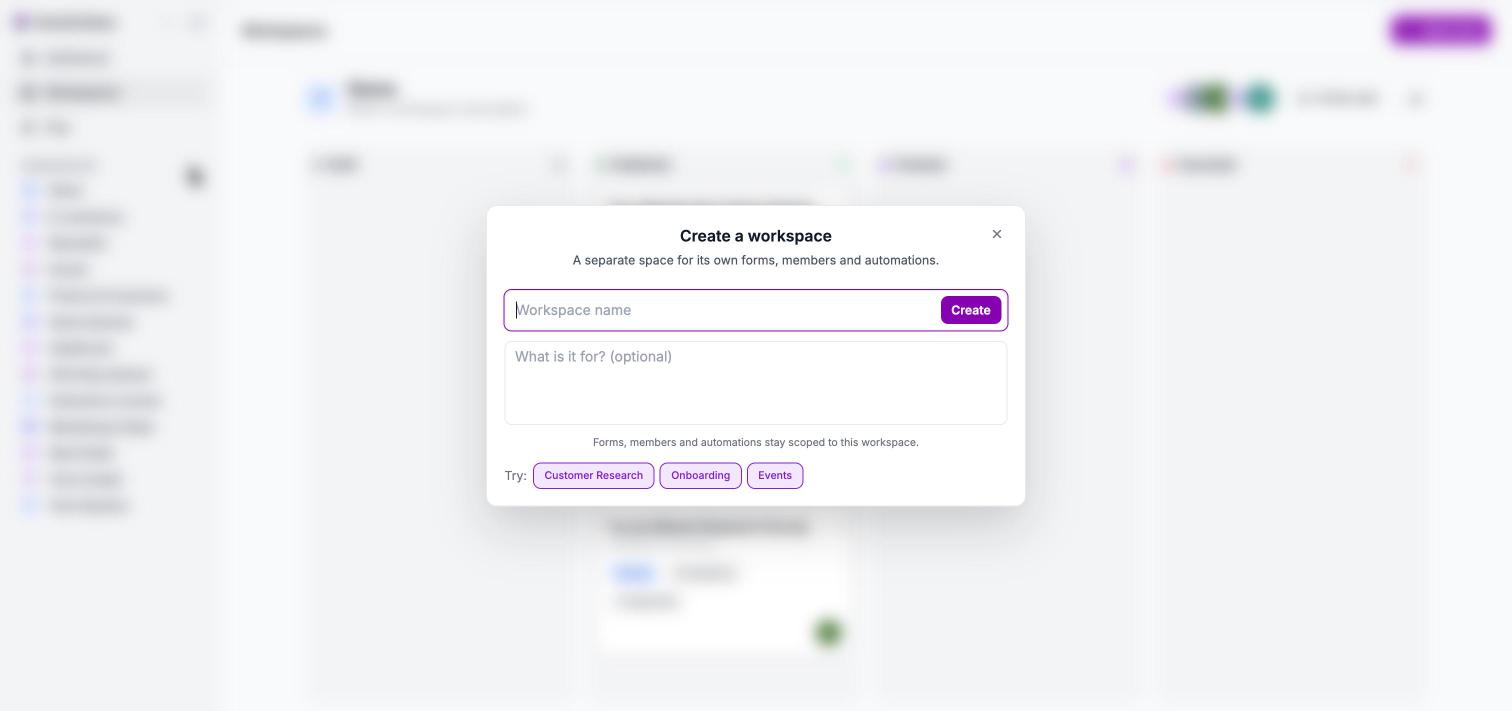
Select **+** next to the **WORKSPACES** list in the sidebar. Enter a **Workspace name**, optionally describe what it is for, and select **Create**. FormAI suggests names such as Customer Research, Onboarding, and Events.
| Column | Meaning |
| - | - |
| **Draft** | Forms you are still building. |
| **Published** | Forms you have published with **Publish**. |
| **Finished** | Forms that have been marked as finished. |
| **Canceled** | Forms that have been marked as canceled. |
Each form card shows the title, when it was last updated, a type badge (Survey, Quiz, or Live), the question count, the response count, and the creator. The **⋯** menu on a card offers **Copy link**, **Edit**, **Rename**, **Results**, and **Delete**.
The workspace header shows the workspace name, an editable description, the member avatars, and **Invite user**. The analytics button in the header opens the **Dashboard** filtered to that workspace.
## People and roles
You add people to a workspace with **Invite user**. Pick a role, add one or more email addresses, and FormAI sends each person an email invite. Invites expire after 7 days.
| Role | In general terms |
| - | - |
| **Admin** | Manages the workspace and its people. |
| **Manager** | Manages forms and sends invites. |
| **Member** | Creates and edits forms. |
| **Viewer** | Can view the workspace and its forms. |
This is a general description of the roles, not a full permissions list. Check what each person can do in the app before you rely on a role for something sensitive.
## Create a workspace
Select **+** next to the **WORKSPACES** list in the sidebar. Enter a **Workspace name**, optionally describe what it is for, and select **Create**. FormAI suggests names such as Customer Research, Onboarding, and Events.
 ## Next steps
Create, describe, and organize workspaces and their forms.
Send email invites and choose a role.
Survey, Quiz, and Live: what each one is for.
Where your plan and credit allowance live.
This documentation is built and hosted on [Mintlify](https://mintlify.com), a developer documentation platform.
## Next steps
Create, describe, and organize workspaces and their forms.
Send email invites and choose a role.
Survey, Quiz, and Live: what each one is for.
Where your plan and credit allowance live.
This documentation is built and hosted on [Mintlify](https://mintlify.com), a developer documentation platform.